



OTC Daihen Robot FD Series Teach Pendant Working Conditions & Fault Background
In automated arc welding, handling, and palletizing workstations, the OTC DAIHEN FD series handheld teach pendant (common standard models such as FDTPDSJN-3L08, L21500B00 series, etc.) is the core human-machine interface (HMI) for operators to execute process trajectory teaching, debug electrical constants, and monitor welding arcs in real-time. Because the teach pendant operates year-round in continuous workshop environments with heavy smoke, strong pulse radiation, frequent metal spatter, mechanical dragging, and occasional dropping, its internal precision electronic components are highly susceptible to physical damage or electrical fatigue.
When a teach pendant fails, it often causes the entire robot line to fail to boot, the servo loop to fail to connect, or programs to become unchangeable. To assist enterprise maintenance supervisors and workshop electrical engineers in quickly locating the fault source and implementing precise part replacements, we have systematically compiled the seven most common core fault symptoms, deep physical causes, and standard official repair solutions for the FD series teach pendants below:
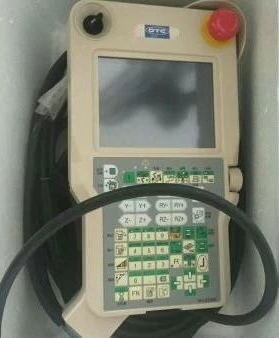
📷 Figure 1: Standard OTC Daihen FD Series Robot Handheld LCD Teach Pendant Assembly Appearance
🛠️ OTC FD Series Teach Pendant Common Fault Diagnostics & Hardwired Repair Matrix
When specific faults occur, the maintenance team should first perform preliminary signal level or contact impedance tests against the table below to ensure extreme clarity:
| Common Fault Symptom | Deep Physical Cause | Advanced Diagnostics | Standard Official Repair Solution |
|---|---|---|---|
| 1. Poor Touch Screen Contact or Partial Failure | Hardening, deformation, or scratching of the outer resistive Indium Tin Oxide (ITO) conductive layer, or metal spatter wedged into the bezel gap causing continuous contact arcing. | Try using shortcut keys to enter the constant menu and perform a standard 5-point calibration mapping. If calibration points cannot be recognized or drop out halfway, the outer layer is deemed punctured. | Dismantle and quickly replace with a brand new, genuine imported resistive Touch Screen Panel Assembly (W-L02140). |
| 2. No Display After Turning On Main Control Cabinet Power (Black Screen) | Internal central processing CPU chip failure in the teach pendant, weak power supply fluctuation of the switching power supply in the cabinet, or broken internal wires of the high-flexibility shielded trailing main cable. | First, measure if there is standard regulated voltage input at the tail plug end of the teach cable. If the voltage is normal and the main cabinet passes self-test, it indicates internal hard bus damage within the teach pendant. | Send for repair to inspect the Internal CPU Mainboard (L20060C00 / L23700C00) or troubleshoot and replace the LCD display module. |
| 3. Incomplete Display, White/Blurred Screen, or Vertical Bright Lines | The handheld terminal suffered severe dropping or heavy object crushing, causing micro-cracks in the LCD inner screen glass, or a disconnection between the built-in driver IC and the conductive rubber. | Visually observe that the outer protective film is intact but the inner screen shows ripple-like ink marks, or local bright lines are frozen and do not shift with screen switching. | Completely disassemble and quickly replace with a brand new, genuine high-definition Backlit LCD Display Assembly (100-1905 / 100-3632). |
| 4. Unresponsive Physical Function Keys or Scrambled Characters | Excessive force by frontline operators or penetration of glove oil/grease, leading to carbonization and open circuit of the internal elastic self-locking circuit in the physical keyboard layer, or casing damage. | Pressing a physical key (such as high-frequency keys like Record or Write) shows absolutely no change in impedance continuity, and the teach pendant functions cannot proceed. | Fully peel off and replace with a brand new, genuine Simplified Chinese/English physical Membrane Keyboard Keypad (L23712G02 / 5096-605). |
| 5. Dim Image Displayed but Completely Lacking Backlight | Thermal fatigue breakdown of electronic components on the teach pendant’s built-in high-voltage inverter board (HV board), or physical aging and open circuit of the backlight Cold Cathode Fluorescent Lamp (CCFL). | Under vertical illumination from a strong flashlight, the underlying system text can be faintly seen running, but the backlight illumination has completely failed. | After detecting the mainboard power output, selectively dismantle and replace the dedicated High-Voltage Backlight Driver Board (HV Board) or lamp wiring harness. |
| 6. Joystick X/Y/Z 3D Axis Malfunction or Zero-Position Drift | Eccentric wear of the potentiometer winding at the base of the 3D high-precision joystick, metal fatigue of the center positioning return spring, or axial bending caused by forceful external impact. | During manual teaching single-axis movement, the robot still experiences spontaneous micro-drifting or large-scale position feedback dead zones after the joystick rebounds. | First clean the external oil/grease. If the internal resistance deviation exceeds the standard, it is mandatory to replace the entire assembly with a brand new, genuine precision 3D Manual Joystick Mechanism. |
| 7. Emergency Stop Large Mushroom Button Failure or Inability to Self-Lock | Wear and breakage of the internal dual-circuit mechanical limit clasp of the emergency stop button causing it not to self-lock when pressed, or Normally Closed (NC) mechanical contacts sticking due to arcing. | Using a multimeter in ohms mode connected to the external safety terminal block (TBEX1), the continuity state refuses to transition when the emergency stop is pressed. | Involving line-wide red-tag safety prevention interlocking, it must be immediately replaced with a genuine, high-reliability Dual-Circuit Self-Locking Emergency Stop Button Assembly (L21500L00). |
💡 Fine-Tuned Workshop Protection Process Specifications to Reduce OTC DAIHEN Teach Pendant Comprehensive Failure Rates:
- Mandatory Application of High-Quality Industrial-Grade Tempered Protective Film (e.g., L21510B01): Resistive touch screens are extremely sensitive to direct poking by sharp, hard objects. Frontline operators are strictly forbidden from using the sharp ends of welding wires or screwdriver edges to press the screen out of convenience. It is mandatory to apply original high-transparency tempered protective films (
L21510B01/L23700B12) to every new teach pendant and provide soft plastic insulated stylus pens for operation. - Prevent Excessive Twisting Stress on Trailing Cables (L21501B00): Long-distance shielded control cables connected to the tail of the teach pendant often become knotted during daily dragging. When the internal shielding braid of the cable suffers hidden breakage due to twisting, high-frequency harmonic noise generated by the robot positioner can reverse-couple and break down the switching power supply chip inside the teach pendant. Before the end of each shift, manual wire organizing should be organized to straighten the wiring harness and properly hang it on dedicated stainless steel hooks (
L23700B03). It is strictly forbidden to leave it on the ground to be crushed by metal dust.
🛠️ Quickly Obtain a Full Set of Teach Pendant Consumable Spare Parts & Authorized Expert Technical Support
Once a handheld teach pendant experiences severe physical shattering, water ingress short circuits, or mainboard communication failure, it will cause the entire automated welding production line to be completely paralyzed. We have established a comprehensive spot inventory turnover center. You are welcome to provide specific part material codes (such as touch screens, LCD panels, joysticks, emergency stop switches, or complete machine rotary quick-change parts), and contact us directly to obtain the latest official standard factory quotes, today’s real-time inventory details, and advanced system integration solutions:
Why Strictly Adhere to Genuine Imported OTC DAIHEN Consumable Parts in Industrial Automated Arc Welding Lines?
Digital robot welding stations are typical heavy industrial equipment with highly closed-loop control of high-voltage, high-current arc inverters and multi-axis trajectory precision interpolation. The use of substitute or highly imitated electrical components from unofficial channels (such as aftermarket unshielded main control cables, non-explosion-proof switching power supplies, or low-end outer screens) can easily cause bus disconnection and packet loss during the high-frequency arc ignition discharge moment of the robot due to substandard resistance to external noise radiation interference, thereby causing the teach pendant’s main CPU computing card to completely short-circuit and be scrapped. We guarantee that all supplied genuine human-machine interface touch panels, fully digital LCD backlight assemblies, 3-position safety enabling switches, highly bending-resistant cables, and physical membrane keyboard keypads are 100% brand-new, genuine imported original products from official channels. If you need to confirm today’s real-time spot inventory of parts, obtain a complete set of control cabinet TBEX terminal block external circuit wiring manuals, or Fronius special high-precision welding system spare parts information, please feel free to contact our technical service team.